
Lyrics That Follow You
Wherever You Go.
Ever wanted to sing along to your favorite Japanese, Korean, or foreign songs on Spotify or YouTube Music? Flying Lyrics gives you floating synchronized lyrics, instant romanization (Romaji, Romaja, Pinyin), and live translations so you never have to switch tabs while gaming, working, or studying!
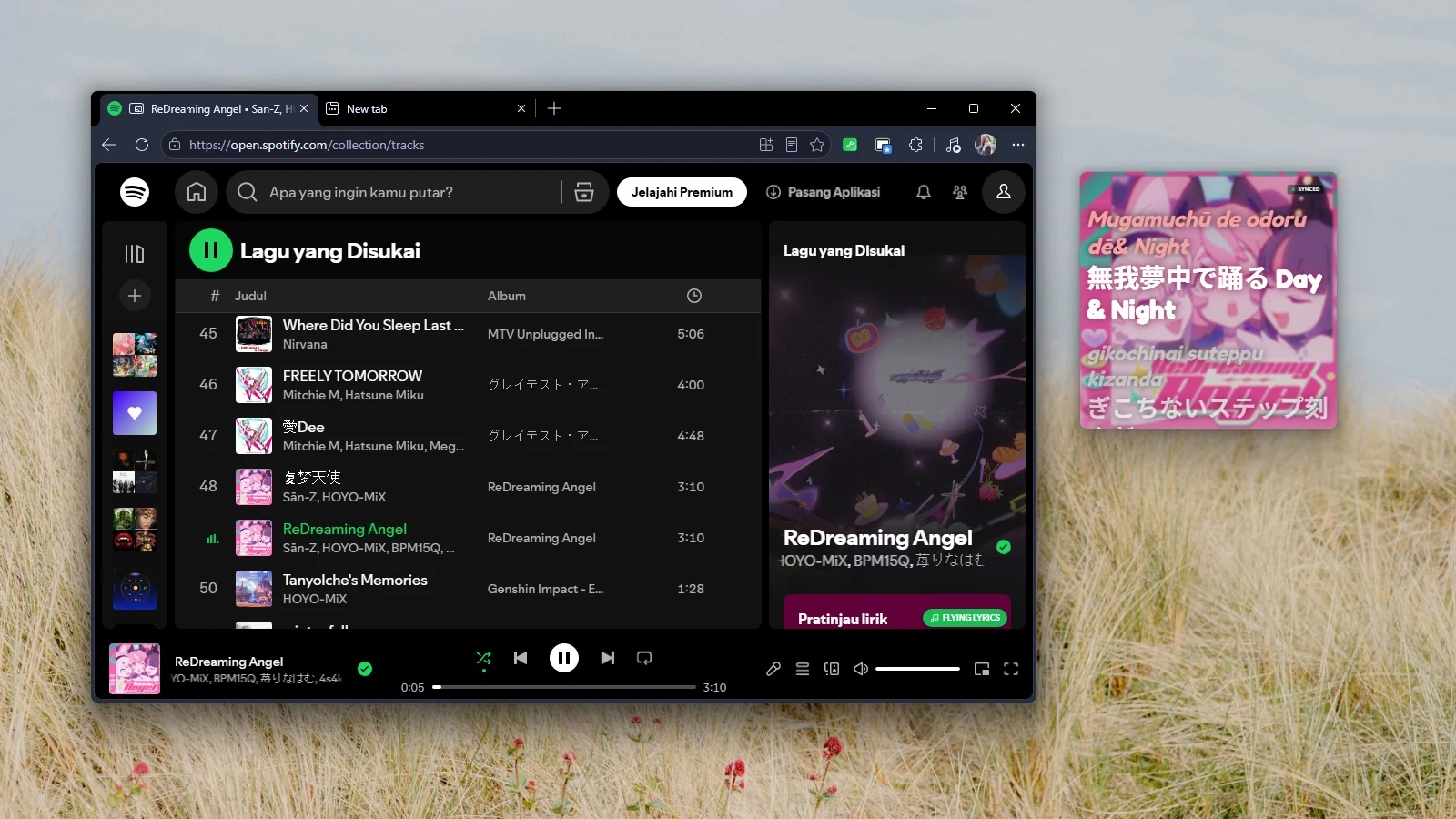



See Romanization in Action
Experience Flying Lyrics live. Sing along with phonetic lyrics in Japanese (Romaji), Korean (Romaja), or Chinese (Pinyin) alongside real-time translations.
Everything You Need to Sing Along
Handcrafted for listeners who want lyrics that float above work, games, code, and chat.
Always-on-Top Floating Window
Never switch tabs again. Keep lyrics visible above VS Code, Discord, games, or your browser. Features Borderless Mode (Video PiP) and Standalone Pop-out Mode with integrated player controls (play, pause, skip, scrub timeline).
Triple-Layer & Instant Romanization
See original lyrics, phonetic romanization (Romaji for Japanese, Romaja for Korean, Pinyin for Chinese), and automatic translations in 29 languages powered by Google Translate with offline fallbacks.
Multi-Provider Auto-Search
Automatically pulls lyrics across three massive lyric databases: LRCLIB, NetEase, and KuGou, plus your own local .lrc files. If lyrics exist anywhere online, Flying Lyrics finds them!
Chameleon & Galaxy Themes
Automatically extracts dominant colors from your current album art to match your music's vibe. Enjoy Galaxy Mode with animated stars, 30+ cosmic presets, and 1,900+ Google Fonts (featuring Fredoka by default).
Sync Timing Tweaks & Editor
Lyrics slightly desynced? Fine-tune millisecond offsets with Sync Offset (ms) to lock in perfection. Your timing offsets are remembered per song. Includes a built-in single-click lyrics editor to correct typos or add missing lines.
Eco Mode & Zero Battery Drain
Frame-rate independent smooth scrolling that glides effortlessly. When running on battery or idle, Eco Mode caps rendering rates, reduces GPU glow effects, and pauses redrawing completely.
Ready in 10 Seconds
Start floating lyrics on Spotify Web Player and YouTube Music immediately.
Install Extension
Add Flying Lyrics from Chrome Web Store, Microsoft Edge Add-ons, or Firefox Add-ons (AMO).
Click ♫ FLYING LYRICS
Spotify: Bottom-right on the player bar next to volume.
YouTube Music: Top-right corner of the page.
Why Flying Lyrics Stands Out
See how Flying Lyrics turns ordinary music listening into an interactive karaoke & study tool.
Frequently Asked Questions
Flying Lyrics is officially available on the Chrome Web Store, Microsoft Edge Add-ons, and Firefox Add-ons (AMO).
Flying Lyrics runs as a browser extension, integrating directly with Spotify Web Player (open.spotify.com) and YouTube Music (music.youtube.com). Once opened, the floating window stays on top of all your desktop applications!
Flying Lyrics supports Japanese (Romaji / Furigana), Korean (Romaja / Revised Romanization), and Chinese (Pinyin with tone marks). In addition, translations are supported for 29 languages.
Borderless Video PiP Mode provides a borderless picture-in-picture stream that stays on top within browser constraints. Standalone Pop-out Mode detaches into a resizable OS window with full playback controls and persistent layout.
Yes! Flying Lyrics is 100% free with no ads, tracking, or accounts required. You can review the complete source code on GitHub at github.com/Crlyzd/flying-lyrics.